Showing posts with label Tutorial. Show all posts

Sunday, May 19, 2013

New A Year of Flowers 2 Video

 
Thanks everyone for the wonderful feedback for my Pretty Patterns 2 video, I'm so glad you are all finding them so helpful! (It sold out yesterday, but Gina will be ordering more! You can also create similar effects with the stamps in Pretty Patterns)

Today's short video shows how I took a project from my first book A Year of Flowers, and updated the card with just a few changes using my new A Year of Flowers 2 set,
for an entirely different look. This also includes a brief introduction to my first book A Year of Flowers.   I also share the watercolor Copic coloring look I did in my first two A Year of Flowers 2 videos (which can find on myYoutube channel), this time with a different flower from the set.  This card start to finish can be made in under 10 minutes.  Please enjoy!

A Year of Flowers 2 stamps (there are a few left in stock now, but Gina will be reordering)

A Year of Flowers book

I posted this on StampTV this morning as well, just making it easier for people to find it. :)

Happy Sunday!

Saturday, May 11, 2013

Pretty Patterns 2: Video #1

Yay, my video for Pretty Patterns 2 is now working!  Please check it out! And more videos soon to come for this set, since there are a zillion and one pattern possibilities. :)  

And here is the card I made, which also uses Blessing from Above.  
Friend is having a little boy, praise!

  Please write if there are specific patterns you need help with or would like to see, as well as coloring requests, of course.  Now that I have my new lights, the conversion software, I'm set to do these regularly!  Have a terrific weekend!

Thursday, February 28, 2013

You're Invited! Gina K. Designs Illustrator Hop (and a video!)

Good morning!  Welcome to our Gina K. Designs illustrator hop today, sharing inspiration for all our new sets releasing tonight and making sure you put tonight's party down on your schedule! 
As always we'll have contests, chatting, prizes, and full reveals of the new stamps and projects made with them from our fabulous design team!  

Here is a quick card I made with my new A Year of Flowers 2 set.  In this set, you get all the same types of flowers, leaves and stems (plus a few more!)  that are so versatile for building designs for all the different holidays and seasons from the first A Year of Flowers set, but this time drawn in a more stylized, sketchy way. I think you will love being able to change up the look this way, or really enjoy it if more whimsical images are your preference (or your recipient's) over realistic ones.  They certainly lend themselves to the same techniques as the first set, as well as some others!
Also, if you are a fan of my previously released Pressed Flowers bold set, you'll be happy to know how well those images work two step stamping style paired with these new line art ones.  A sketched  image layered over a more realistic solid image is such an easy way to add color to your projects as well as being a fun, trendy look!  The sentiment here is from Tami's new All Occasion Tags 2, and with the script font and year round sentiments, it is just a perfect match for this year round floral set!  This card uses just two markers, one pad and 2 colors of cardstock, how's that for economical?

After tons of requests from my readers and our StampTV fans of how I do certain techniques since Gina started sharing videos on STV, I finally made a short video for you, of how I colored the card above. Go easy on me, it's my first!   A bit of trivia, this video is just over 5 minutes long but I had to check watching it: the flowers took me only 1 minute and 20 seconds to color! And that's with talking and pausing! Soooo fast and easy! Love it!


Let me warn you,  I didn't notice until afterwards that I called my Copics "Memento markers" (ack, so different!! but at least I listed the colors correctly), presumably since I'd just mentioned my Memento pad*, trying to be all like Gina, ya know,  listing "all the products and tools needed to complete the project", hee! So *please* don't email me that those are Copics in the video. Yes, I know, lol!  Hopefully you saw my notation at that point. My next video will be better!

Anyway, goofs aside, I  hope this conveys how ridiculously quick and simple it is to get beautiful results with your markers and the new images from A Year of Flowers 2! :)

  Supplies used:  Gina K Designs Pure Luxury Black Onyx and Sandy Beach cardstock, A Year of Flowers 2 and All Occasion Tags 2, Memento Tuxedo Black ink pad, Copics R05 and G99.
See you at the party tonight! 7-9 PM CST on StampTV

Now be sure to check out samples from our other illustrators today who are reviewing their new sets! Be sure to leave a comment on each blog for more chances to win a fun prize pack from Gina K:  a package of Birthday Hoot patterned paper (to match the free owl image with any purchase this month!) and coordinating cardstock pack!

 Happy hopping!


*Although I didn't even call it a Memento pad, the name from the lid just burned itself into my brain!

Saturday, October 13, 2012

Peeking Sunflowers...


Hello! Hope your weekend  is off to a terrific start! Have you been enjoying getting some early peeks on Gina's blog for our new release next week? (click Gina's link to see more stamp previews, plus links to new projects from Tami and Theresa)  Today I'm going to go ahead and show a card I just  whipped together with my new sunflowers in Stately Flowers 5!  Stately Flowers 5 and our other new Gina K designs stamp sets will be available for purchase Thursday night, October 18th at 7 PM CST.  Hope you can come to our party!

This triple panel technique is so easy to do!  Just make a mat stack of three layers, piled on top of each other (Pure Luxury Ivory) and stamp your images over the edges (Memento Rich Cocoa)  Then cut and layer colored mats underneath (Gina K Dark Chocolate). Adhere layers with pop dots.
Here is a quick coloring tutorial (Apologies in advance for cutting the colored caps off in these pics, my camera kept zooming a in a little closer than what they frame showed!)  The first step is laying down the light colors to each area: Y06 for petals, YG93 for the leaves, and E13 to the center.
Next add this beautiful golden yellow (Y19) near the center and tips of petals and in the folds. See how that deeper orange yellow tones down that too bright shade?  Trace YG97 over the shaded areas in the image to darken the leaves and stems.  This image is so easy to color, no need to guess where the shadows gom, they are built in and and the stamped image will darken any color you leay over it, so you need very few markers.  This only used five!

Cut and adhere with pop dots over your mats.
 
Thank for visiting! As much as I love the sunflower from A Year of Flowers, this one is even more details and realistic and will work for so many things I want to make all year long.  Looking forward to showing you  more Thursday night!  

By the way, thank you everyone who has been writing and inquiring about when the next Stately Flowers set would be coming out!  It's almost here, just a few more days!

Hugs!

Monday, August 13, 2012

Inspiration Hop, Day 1: Basket Additions 3, Holiday Basket and Country Roads

Good morning and happy Monday! Welcome to our first day of Gina K Designs Inspiration Hops with the design team! As you hop through the blogs, make sure to leave a comment on each of them, because we will choose a few random comments, and those stampers will each win a grab bag of deeply etched, pre-cut Gina K. Designs stamps! To see the full list of winners check the Big News forum at Stamp TV a couple of days after the hops.
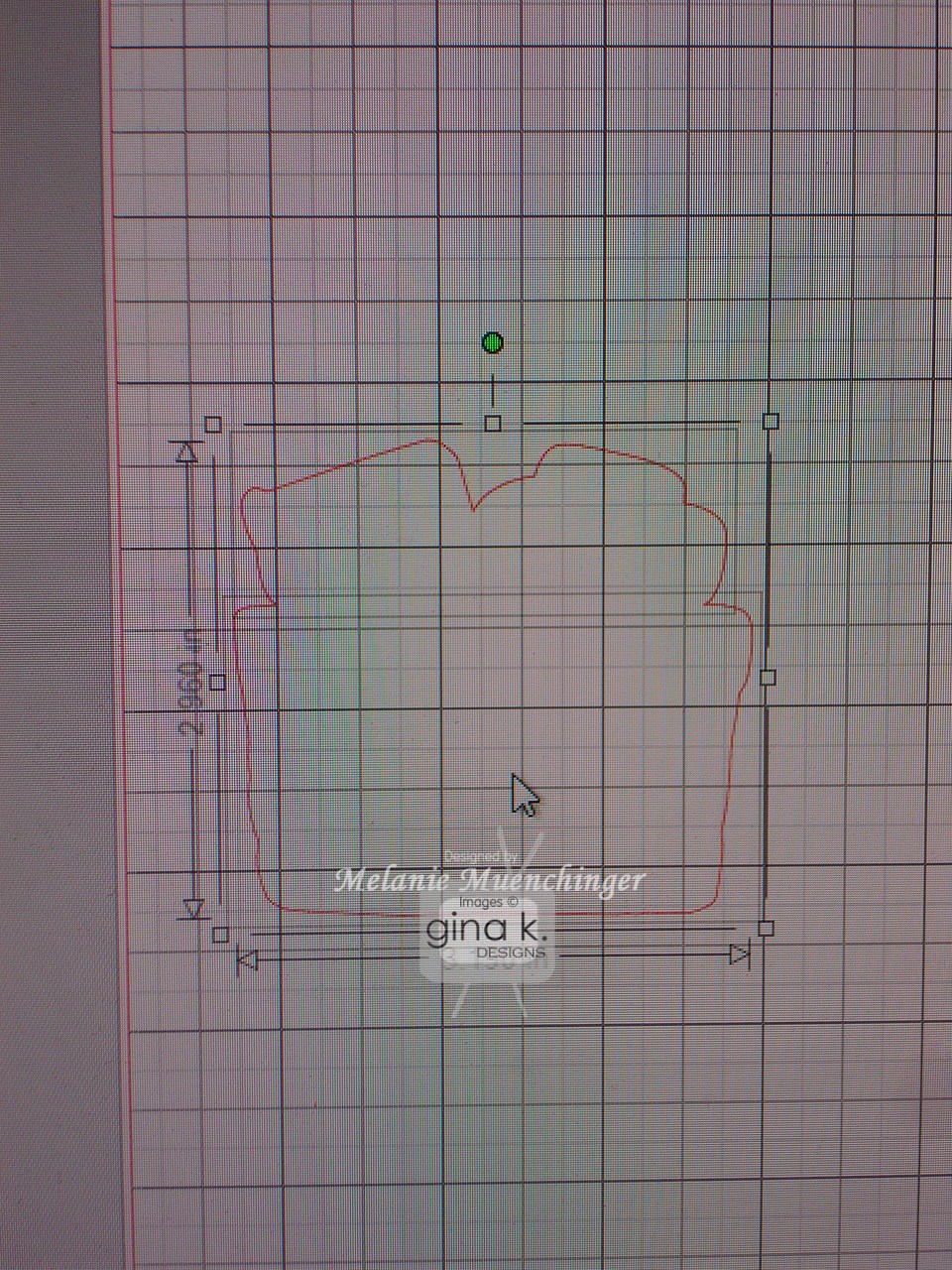
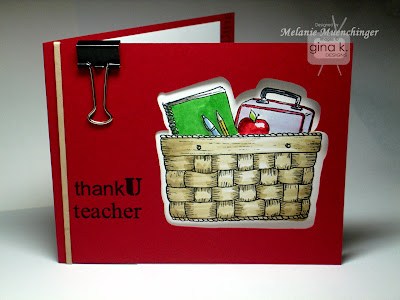
Today we are sharing samples with Basket Additions 3. My design today also uses Holiday Basket, newly released in clear photopolymer. I used the matching Silhouette cut files for both Basket Additions 3 and Holiday Basket to make this cut window. I will show more about how to position the cutout on the card base in the following sample and stamp the image inside, but first I want to show you how you can fuse together the tops and bottoms from these sets into one cut!
Open both files in Silhouette Studio. Under Edit, hit Copy after selecting each image you want by clicking with your mouse (school topper and basket). Open a New file, and Paste both images in. Move them on the screen with your mouse so they are touching each other.
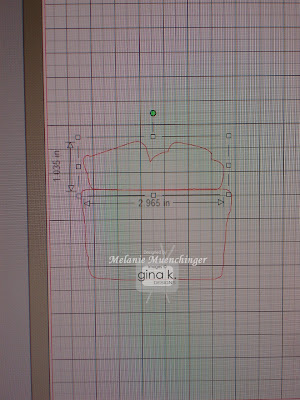
Now click on the eraser tool that's on the left hand side of the screen.
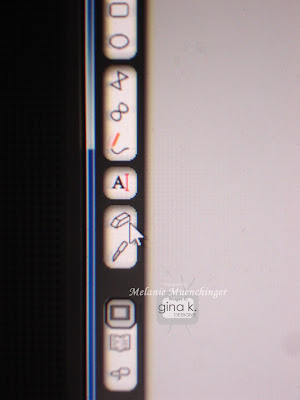
Now position your mouse over the line in the middle you want to get rid of, and this big gray dot will appear.
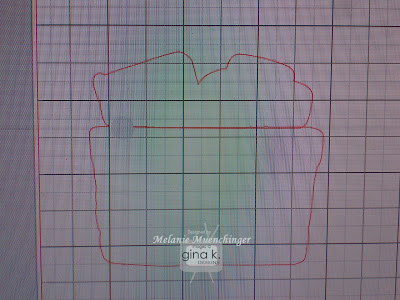
Holding down the left click button on your mouse, begin dragging across and watch the line magically disappear!
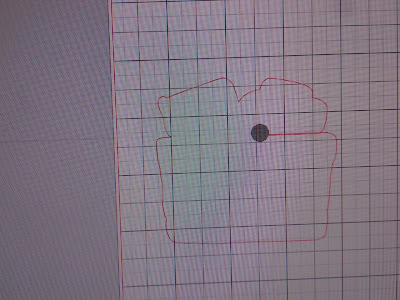
Once you've removed the entire line and have one outline for the whole thing, go just above the image top left, hold down the left click button on your mouse and drag to right right lower corner to create a box around it. Go to the toolbar at top, click Object, and then in the drop down menu, select Group. Now these images are attached and you can drag it wherever you want on the screen. (You can also do this before you erase if you want.)
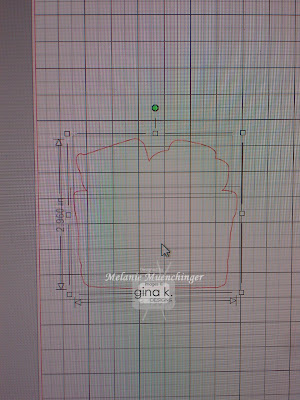
Save this file if you want (ex: "schoolbasket") so that now any time you'd like to stamp these images together, whether as the cut out to stamp on or the window for the images to show through, they'll be cut as one piece! Just be sure not to change the originals, make copies first! :)
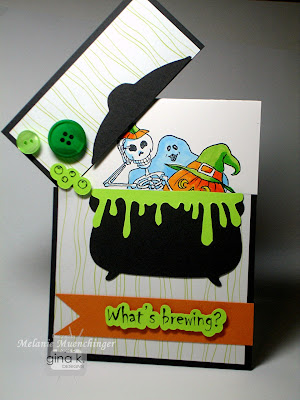
If you don't have the Silhouette Cameo, simply stamp the images on white cardstock, color and cut out, then mount on top of the red base popped up. I added some school supply touches like a rubber band and a binder clip, just dug them out of our junk drawer, love the ease, affordability and style of office embellishments! Cardstock is the new Pure Luxury Cherry Red.I also wanted to show a fun hinged card I made using the Create a Cauldron print and cut file with the Halloween image from Basket Additions 3. (If you don't have the Silhouette Cameo, simply use the digital image version and cut with scissors.)
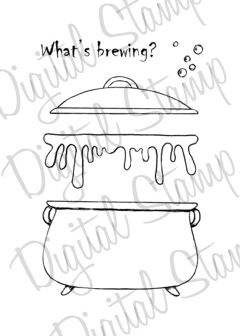
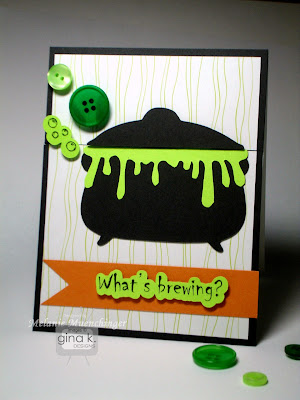
Boo! Surprise! Cauldron and mat are Pure Luxury Smoky Slate and goo is Pure Luxury Key Lime. Patterned paper is from the Gina K Hello Sunshine pack.The top layer is attached with a brad and hidden by the bubbles. Now that I've finished this hinged card, I'm inspired to show you another hinged design using Holiday Basket, check back for that soon! :)
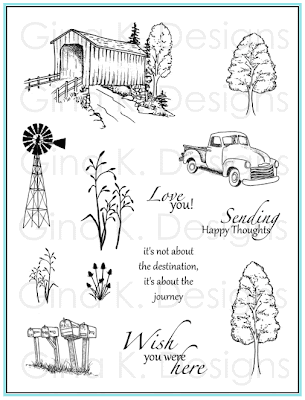
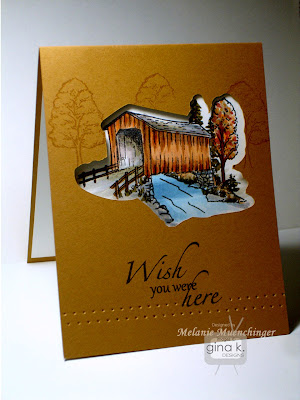
Next up, we have Theresa Momber's Country Roads, one of my favorite sets she's ever done! She really captured the pastoral feel of the country with the images and I love the fonts, particularly the graceful calligraphy. On today's sample, I used the covered bridge image and the matching Silhouette cut file to create a window to frame it. Using not just the cut outs themselves but the negative space as well, strategically placed on your mats and card bases, is so striking (and uses ALL your paper, no waste!)
Let me show you how! After opening the cut file, click on the bridge image and select "Copy" under Edit on the toolbar. Open a New file, then hit Paste. This will add the bridge to the new file. Considering this top fold card will be 4 1/2" X 11", position the images within 4 1/2" from the left side of the square on the mat, and the bottom half of the card, which will be the front, spanning from about 6 1/2" to 9". The grid helps you position is where you want.
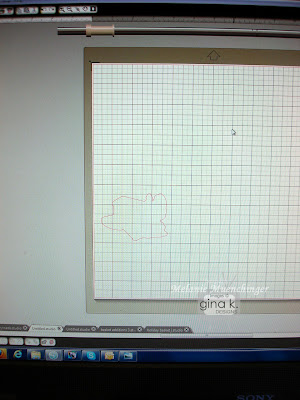
Now place your cardstock (4 1/4" x 11") portrait style on your mat aligned with top left corner, hit "Send to Silhouette" and "Cut". Pull your cardstock off. Save the cut bridge for another project. Save this new file you made if you want to use it again, as "Bridge Card", or something like that.
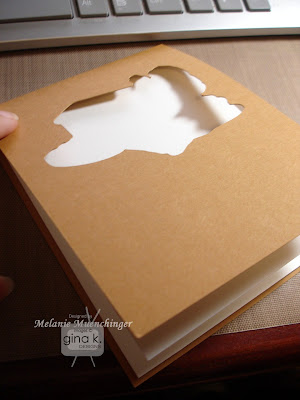
After the Silhouette cuts it out, score at 5 1/2" as usual for an A2 card and fold. Now cut the white layer to go inside, 4" x 10 3/4" and score at 5 1/4". Adhere to inside (just the back, front is free to move)
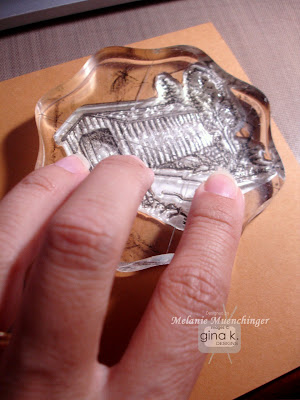

Hold the layers down and stamp the bridge (inked in Memento Espresso Truffle) inside the cut out.
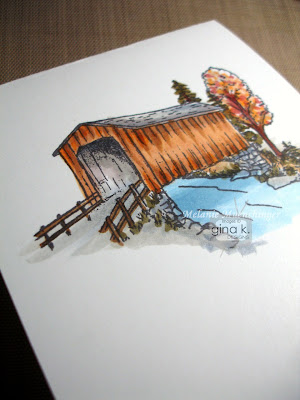
Fold back front and color with Copics. (I used most of the same colors as Theresa used in this post. I also added little darker blue stripe under the bridge to cast a shadow on the water.)
Last, add the greeting in Memento Tuxedo Black and add some trees around the window with Versamark. Create pierced rows for detail with Scor-Bug tool. Cardbase is the new Pure Luxury Honey Mustard.
http://api.ning.com/files/PsJxvi-*WJtrsT8RMY93fpIX*ncOBPlXz5QBCUxIXw9lMw1MGgzt4vrNGAam-p1JqkZyVNAlmVXhVeAhfA1Vybw7eMoRx8s-/Designteambutton.gif
Enjoy hopping with the rest of the Gina K Designs design team for inspiration with these sets:

Friday, May 18, 2012

Silhouette Cameo: MUST HAVE


Just a quick post because I have so much to get done today, but I couldn't wait to tell you just a bit about the new Silhouette Cameo that arrived at my house last night, I've been stalking the mailman ever since I ordered!! Hope you all saw the message from StampTV that Gina is now selling the Cameo in the Gina K Designs store for the best available price and it is absolutely amazing, you won't believe all you can do with it and how inexpensive it is to cut anything your heart desires once you have invested in the machine! Soon we will be able to cut out all our stamped Gina K Designs images as well, can't wait, can't wait, it will change the way we all craft! I made my first cuts tonight and this morning so I had to come show you (with my NINE year old son setting up the machine and installing the software! You can do this!)

The software is so simple and it comes preloaded with 50 beautiful and useful shapes, words and backgrounds, PLUS a $10 gift card to go shopping with immediately in their online store so the shapes you love and need the most! Can't wait to use that! And NO wait for something to ship or a need for space or a system to store it, it downloads instantly to your computer you can cut it, minutes later!

One terrific thing is you can cut any font you currently have on your computer and in any size for FREE, immediately. Well, we (Jonathan and I) had to try that because I've never had have the capability to cut letters, which are so great for cards and scrapbook pages. Here is a 3 inch tall "J" my son cut out of patterned paper using the Stencil font from my MS Word program. (Software instantly imports all these from your computer when it installs no extra step for you to find them) Perfectly cut! This is a very thin patterned paper, so the blade was set for 2. Went through like buttah! (butter)

Now here is a Scalloped Background, also included, you can cut this as large as your 12x12 paper, or here I sized it 4x4 for a card front. Unbelieveable detail, cut in about a minute (fun to watch the blade do its work, too!)

Unfortunately, I underestimated how deep the blade would need to go for our super thick, super luxurious heavy baseweight Pure Luxury Lipstick Red, it did not go all the way through and that setting for the designer paper. (There ARE recommendations for you on different material thicknesses in the manual, we got a little ahead of ourselves) But no matter, I will not let this gorgeous design go to waste, however, will just trim around to make a square mat and stick on a card, and everyone will wonder have I made this gorgeous engraved texture. :) So I'll try that design again later with the proper setting, but moving on!! (It will go through these cardstocks no problem as you'll see below, never fear!)

Now here is a 5 inch leafy stem (also included in the software! how versatile and pretty!) cut from Pure Luxury Green Grass.

I put the blade setting on 10, that is the highest. (I tried several lower settings and it made a gorgeous cut design, but would not go all the way through. Again, I'll use those!) Layering weights like Pure Luxury White and Ivory and Pure Luxury Accent Colors are thinner and will not need such a high setting, probably a 3 or 4.) This, however, peeled off the mat like a dream, look how fine that stem is, it's like a piece of floss!!! Are you drooling yet?

This is what the screen looked like so you can see exactly how big for your finished cut will be and can drag it to any spot on your mat. Awesome customizing the size for your specific use!

I can't wait to explore the potential of this dream machine, as well as shop for fun cut outs, AND create perfectly cut flowers and other images from Gina K DESIGNS!! Scream! This is an amazing investment, I cannot recommend the Silhouette Cameo highly enough. Put in on your birthday list, your Christmas list, your belated Mother's Day list, because you need it, will take your cards to another level and save so much time and money!

Will share more soon, have a terrific weekend!

BTW, while you are here, thanks for visiting! My feed to my readers seems to have stopped working again, so if you haven't been getting my posts you want to resubscribe or try a new way to follow subscribe to my blog! Thanks for your help, any linking to let people I'm know still alive and posting, or linking posts you especially like like this one is greatly appreciated! :)

Tuesday, April 3, 2012

Magnolia in a Vase, and Some Info

Good morning! Today I have a magnolia from "Stately Flowers 3"(one of my favorite images in the series!) inside a small bud vase from "Buds and Vases". I just love the mix and match possibilities for all my floral sets with these vases and baskets since they are drawn in the same style and scale! Cardstock is Gina K Pure Luxury Chocolate Brown, Little Boy Blue, White, and Lemon Drop. Die cut is Spellbinders Labels 20.
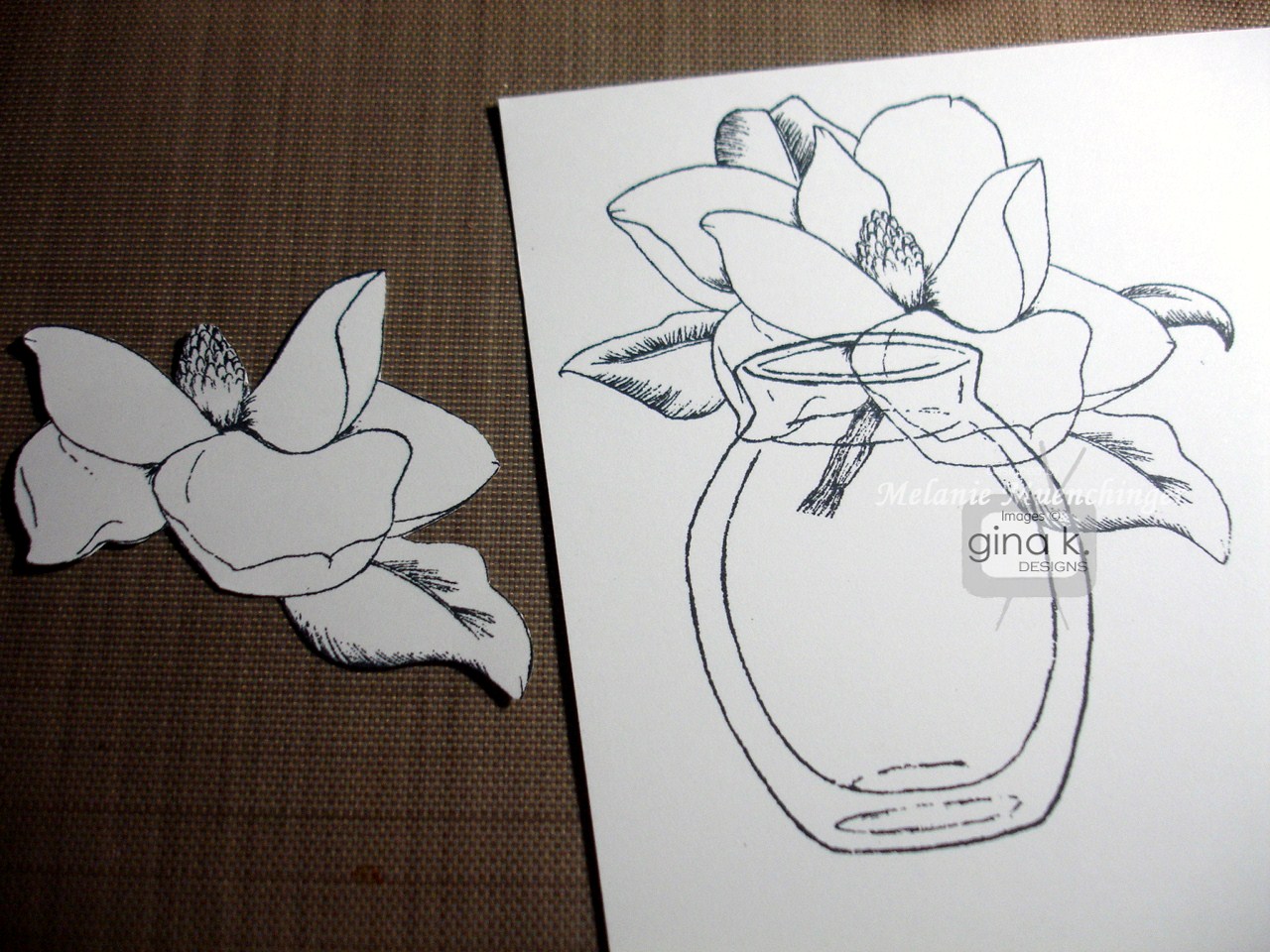
First stamp the flower and the vase in black on white CS. No need to mask, top where images intersect will be covered. Just stamp a second magnolia and cut out the petals that will overlap the vase in the front, plus a few extra. This will create so much dimension in the final floral image.

Color the center with Y11 and shade left side with W-3. Use C-3 to create shadows on petals at center and undersides. I just make tiny flicks with the tip. Do the same for the edges of the vases and to suggest water and a shadow underneath. Use a blender to blur lines if edges of gray look too hard to you. that's all you need to fill this clear vase with water!
Now add YG93 to the part of the leaves that are shaded and leave the areas on the outside and toward the middle with no black hatching marks white. I went ahead and colored on of the leaves that will be covered by the popped up flower, just in case you can see underneath form certain angles, but no need to shade as as you do on the exposed top flower.

Here it is layered and mounted on the card.
I added an adhesive pearl on the greeting and embossed both he chocolate and blue layers with Victoria CB folder. TIP: Adhere the brown layer first and then emboss together for a seamless pattern. Hope this card inspires, I adore these two images together!


Before I go, I wanted to address Verna's question from yesterday about loving the flowers, but not really having a use for the state name stamps. I totally get that, Verna, and am sure it has crossed others' minds! (and of course, not all of our GKD fans even live in the US, they are all over the world!) If you look over the sets, however, you will see the state names are really a very small percentage of the total stamps, both by number and square inch of rubber used, here is a breakdown:

Stately Flowers 1-20 stamps: 8 flowers, 1 design element, 4 sentiments, 4 flower names, 4 state names

Stately Flowers 2- 18 stamps: 6 flowers, 5 sentiments, 3 flower names, 4 state names

Stately Flowers 3- 17 stamps: 6 flowers, 3 sentiments, 3 flower names, 4 state names

(If you are worried there is a trend that each set has less than the last, the images just got bigger. And I am happy to report the next Stately set to come out has even more images and greetings than the last few, plus some "winged things" to go with, know you will love! Stay tuned!)
I want to let you all know, if you don’t have any of the Stately sets, that these are some really BIG images! The magnolia, for example, measures 3 3/8” x 2 ½”. That's a big stamp! Your card needs little else to feel complete. Also, I pack these stamps into sets as *tightly as possible* to still allow for cutting. There is very little rubber left. If you compare them to other sets of similar size on the market, these have far more greetings and images. I try not to let a bit of space go to waste to provide the maximum versatility and bang for your buck!

I'll admit, I've bought many a set in the past that has a a few images which never see ink as well as the extreme that I got something for just ONE image ( I know, I know!!), but used that one stamp so much that I felt it was well worth it! I hope these flowers would make you feel the same. They are terrific for patterns and colored focal points, and thought carefully about which flowers I put in each set together, to give you a lot of different looks and hopefully at least one flower that really makes your heart skip a beat. You can probably guess from the amount of use each gets on my blog which ones are m personal favorites! ;) And while I have not yet used the state and flower names myself, I am a lover of "words" and enjoy knowing the names of things. On certain designs, particularly vintage ones, having the name and state gives it very botanical feel, lie it's is from an old book or seed catalog.

Finally all these sets coordinate with so many of my other florals, as I've shown the past two days. Baskets are next! :)

Having said that, here are some ideas for those state names (or any stamps in a set that you can't see inking up) if you don't plan to use them... ;)

  • Offer state stamp name as a blog candy or pay it forward
  • Know someone in that state? Send them the stamp as a surprise! Even if they aren’t a stamper, they would probably get a lot of use out of that one word for other items.
  • Post in a online stamp trade forum, someone might really want just that particular state name!
  • Save to use as an adhesive remover! Yes, an un-inked rubber stamps works the same as those adhesive removers you’ve seen for sale. If you have some excess sticky stuff squishing out on your mat, or remove a mat and have a bit of yucky adhesive left over, rub clean stamp over it gently and watch as it peels the offensive stuff off and your cardstock looks good as new! (This does not work if the paper tore off)
  • pads under a coaster or a trivet (hee, this last one is a joke! sort of...!)

Hope this helps you in making decision whether or not to purchase and what to do with any extra "unwanted" stamps! (Find it a little home, stamps need love, too!!) :) I really need to go back to doing tip sheets for all my sets. Let me know if that is something you want and use! Have a terrific day!!

Tomorrow, bunnies!

Wednesday, March 28, 2012

What Butterfly? Tutorial

Good morning! In an effort to come up with something really creative with my Wild Flowers set for you today, I discovered another really fun way you can use those butterfly images in the set: make big, showy leaves for the flowers! Leaf clusters are already included in the set, but these have a different shape and size and the detail inside the wings adds a special touch, and so simple to do.
Here I inked up the larger butterfly with a Memento Pear Tart marker and then added a few streaks to the center with Memento Bamboo Leaves marker and stamped.

Cut out. Snip each butterfly into four separate leaves, or two V shaped clusters. Slip under your flower and arrange as desired. Doesn't this double blossom look terrific?
The flowers are stamped four times with Memento Angel Pink and cut out. Stamp the separate dotted stamp into the centers inked with Memento Tangelo. Curl edges with fingers and mount one on top of the other with pop dots. I added a bit of Crystal Lacquer to the centers and sprinkled on bit of Doodlebug orange glitter before it dried.
Finally, Splendid Circles are definitely one of my favorites of the new Spellbinders die sets, can you believe all that pizzazz and detail you get from just one die cut?? I layered a Black Onyx Classic Circle behind it to make the details inside pop more. Pure Luxury White base is embossed with Cuttlebug Leafy Branch folder.

Hope you enjoyed this simple tutorial! So excited to have all these new "leaves", more stamps, yeah! You'll never look at those butterflies the same again! :) Readers often ask me how I come up with out of the box ideas like this, and truly I often don't see them when I'm designing the set at all. It's only after I am stare at the piece of rubber and just start seeing shapes rather than the whole. Try it, you might be surprised and delighted with what you find! ;)

PS See that linen-looking mat under my work? It's from Scor-pal and I love this Stay Put Craft Mat! Will come back with a post all about it, but it is so terrific for my work surface as well as staging photos for my blog, LOVE!!

Friday, January 13, 2012

Faux Postage Tutorial

Good morning and happy Friday! Today I have a short tutorial for a card I shared at the release party with "Stately Flowers 2", creating a large postage stamp look. Some faux postages use a template that has little dots in between the blocked images to look like perforations, but I really love the look and value of these postage edge scissors I got for 99 cents!

First I stamped my goldenrod in Memento Tuxedo Black on white and colored with Copics.
Then I placed a Long Rectangle Nestabilities over it and traced inside the die with a black pen, going around where the flower overlapped, and leaving the stem open at the bottom. To me this is more interesting than just drawing a box! I love this tall image and ow it fills up the space of this die cut. Notice I also cropped it at an angle rather than straight up and down.
Remove the die and trim with postage scissors. Next I masked the flowers and put sticky notes along the edges of the border I drew, then sponged in Memento Bahama Blue ink with a jumbo sponge dauber.

That's it! I stamped the goldenrod again along the red layer in Versamark and added this greeting from Theresa's "Mountain Wilderness" set. Love, love these tall greetings! (If you look at her blog today, we were thinking about the same thing!) Cardstock is Gina K Pure Luxury Lipstick Red, Black Onyx and Blue Raspberry.

Have a great weekend!

Wednesday, January 11, 2012

Vintage Butterfly Lace Tutorial


Good morning! Here is another way to use the butterfly from "Make a State-ment", it may just be one of my favorite tutorials evah! :) When I was stamping out my pendant last week, I couldn't help but notice that the scalloped edge of the wings and tiny dots along it looked a lot like an intricate lace border! I love the look of lace on cards, bu don't have any. So away with the black ink and I got out my Versamark pad and clear embossing powder. Isn't that pretty! The way the top of their wings is so flat makes it a great trim and border for the side or bottom of a card. The small butterfly from this set just fits inside each pair to make the smaller scallop.
This photo shows it and the smaller butterfly stamped in Versamark onto Gina K Pure Luxury White and embossed with clear powder. TIP: Whenever you are going to create a border out of a stamp element, it's best to start by stamping in the middle of your mat, then stamping on either side. This way you don't have a full butterfly on one end and just part of one of the other, and you don't have to measure! Repeat these steps on the other side of the mat.


Sponge distressing ink over, here I used Vintage Photo. Isn't that gorgeous how the design pops? Doesn't it look like real lace? (I gotta say, it turned out even prettier than I imagined it would!)
Last I added a flower and greeting from "Stately Flowers 2", and another cut and colored butterfly. I used a Petite Oval and Labels 14 Nestabilities to make the label. Use Stardust pens to trace the details in the images for some extra sparkle! Card base is Pure Luxury Ivory.

You can create this butterfly lace with so many different embossing powders or inks for different looks as well as stamping in dark ink on dark paper. In ink, the details will be more crisp and the butterfly will be more noticeable, but with the puffiness and dimension of the EP, you hardly see the butterfly and just see "lace". I think I feel some black lace over red coming on for Valentine's day! You can also trim around the scalloped edges to create another layer. Look for more samples and variations using this technique coming up, as I want to try this a million ways now! This butterfly just became one of my favorite images! :)

Thanks for visiting me today! Please link this tutorial to share with others if you found it helpful!